
From a graded projector PDF to a fabric layout
For pattern designers, selecting a size is only the first step. A layout also needs quantities, fold edges, mirrored pairs and grain direction. This walkthrough sets those by hand in PatternNest using the Grade & Press demo PDF.
The example and its sources
Grade & Press grades a designer's own base-size drawing into a full size range and produces layered print files. It provides the graded demo PDF used here. The demo's pieces come from FreeSewing's open-source Teagan T-shirt, designed and coded by Joost De Cock. This guide covers the demo as downloaded on 7 October 2026, size M. Later files may differ.
I develop PatternNest, the layout tool used here. Grade & Press supplies the demo; this article does not claim an endorsement or an automated integration.
Import only size M
- Open PatternNest, choose files and select the projector PDF from Grade & Press.
- In the layer selector, choose only Size M. Turn off the grid and the information/all-size layers for contour selection.
- Select the four outer contours and keep the PDF scale factor at 1.0000. Confirm selection and add the four pieces. Check their size against the original PDF before proceeding.
| Piece | Contour bounds in this file | Cut setup |
|---|---|---|
| Front | 291.1 × 653.3 mm | 1, on the fold |
| Back | 291.1 × 653.3 mm | 1, on the fold |
| Sleeve | 364.6 × 247.2 mm | 1 mirrored pair = 2 sleeves |
| Neckband | 506.0 × 52.0 mm | 1, single layer |
Set the cutting information manually
The demo PDF does not carry fold, quantity or pairing metadata into PatternNest. The four contours therefore need the settings above. For front and back, mark the straight left fold edge. In this particular import it is Edge 14, approximately 55.9 cm on the front and 62.2 cm on the back. Choose it by its geometry, since edge numbers may differ in another file.
Set sleeve quantity to 1 and enable Cut as pair (mirrored). This counts as two finished pieces. Leave the neckband at quantity 1 with no fold or pair setting. The result is five finished pieces from four placements.
Keep each grain direction as shown in the original file, allowing 0°/180° turns. The neckband's grainline runs across its short dimension; its stretch runs along the band. Do not rotate it by 90° to make a layout fit.
Compare two fabric widths
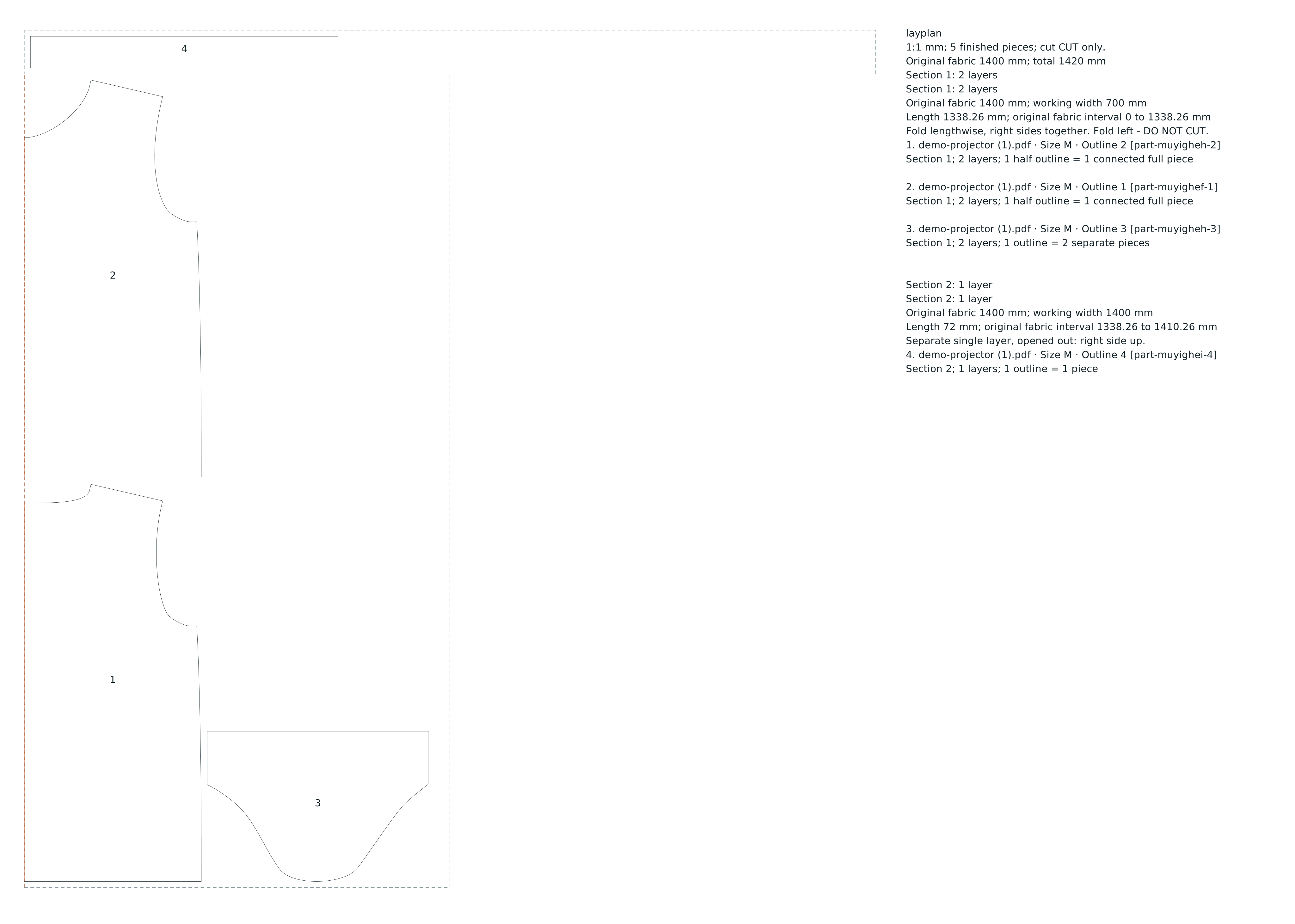
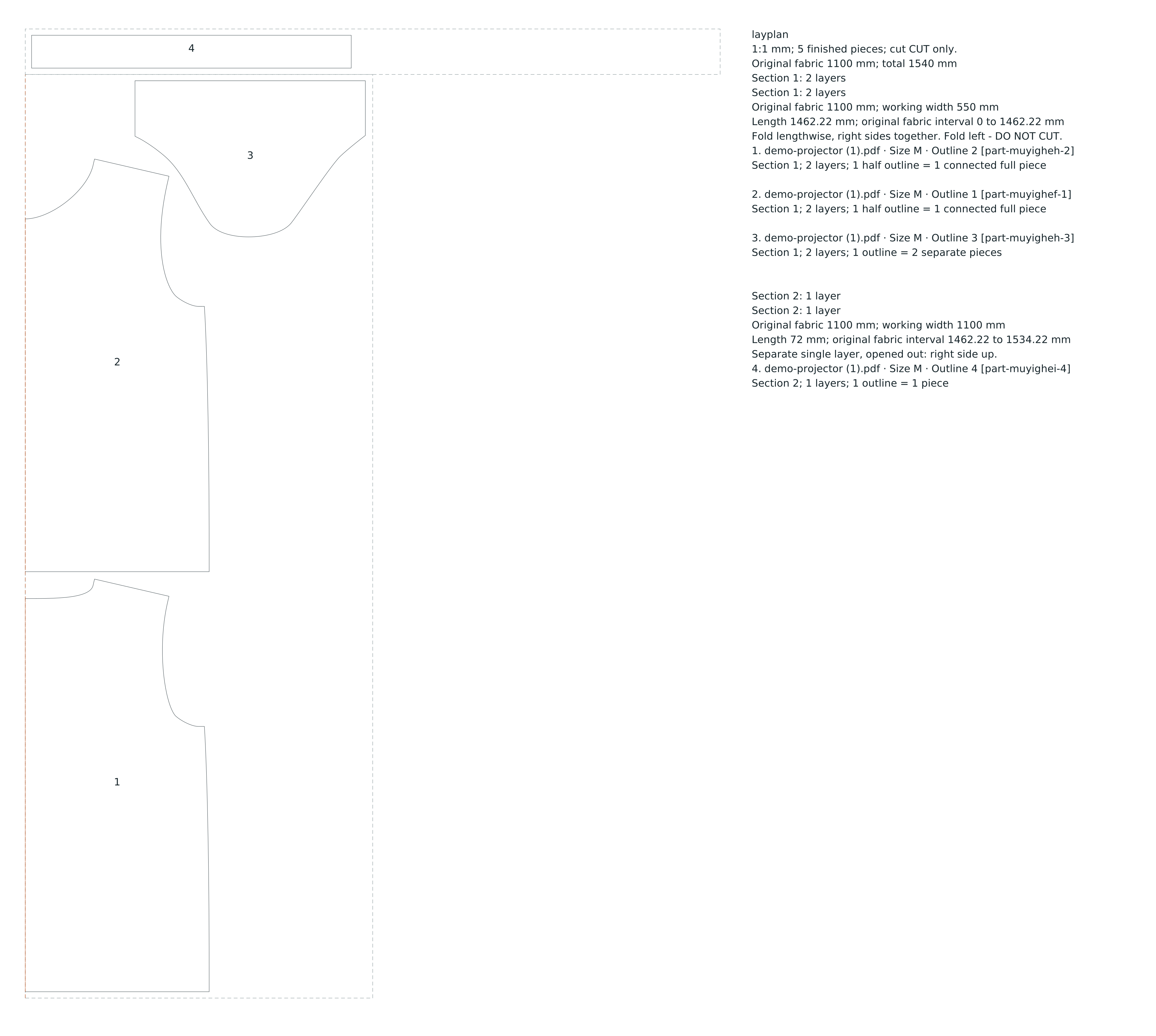
Choose lengthwise-folded fabric, fold on the left, a 10 mm edge margin and a 10 mm cutting gap. Use Standard effort. Calculate at 140 cm fabric width, then change only the width to 110 cm and calculate again.
| Fabric width | Found layout length | Finished pieces |
|---|---|---|
| 140 cm | 1.42 m | 5 |
| 110 cm | 1.54 m | 5 |
Both totals include the separate single-layer neckband section. The geometry, fold edges and exported piece counts were checked against the source files. These found layouts are not proven minimum lengths. The later off-centre-fold feature does not alter these particular results because the neckband does not fit beside the folded section.
Read the exported diagrams
The SVG shows the folded and single-layer sections side by side for readability. They are consecutive lengths of fabric, not two widths joined into one sheet. The overall SVG page width is not the fabric width. Fold edges are marked as lines not to cut.
Use your own pattern for a real cutting plan
Confirm the size, cutting line, seam allowances, quantities, pairs, grainlines and fold edges from the pattern designer's instructions. Check scale in the actual projector or cutting workflow before cutting. Notches, labels and grain arrows from the source are not carried into these layout diagrams; retain the original pattern for those details. Fabric stretch, shrinkage, nap, print matching and the designer's tested requirements need their own checks.
Credits
Grade & Press for the graded demo; FreeSewing and Joost De Cock for Teagan. Diagram calculations and article: Cayan / Madegrain. The source pattern's applicable licence remains with its source.