
Which pattern files work in PatternNest
PatternNest reads pattern pieces as vector outlines from SVG, DXF and PDF files. This page only lists what has been tested with real files. A pattern that isn't listed may well work; you can try it for free.
Tested so far
| Source | File | What comes in | Tested with |
|---|---|---|---|
| FreeSewing | SVG export with seam allowance; PDF saved from Inkscape | Cutting lines, notches and darts, names and quantities from the text | Aaron, Bella, Carlton, Charlie, Jaeger, Penelope, Simon, Teagan, Titan and others |
| Projector and A0 PDFs with sizes on layers | One page, one layer per size | Your size via “Only this”, cutting lines, markings, labels | FreeSewing files with size layers and bought projector PDFs |
| PDFs saved from a drawing program or a browser | Vector PDF, one piece complete on a page | Cutting lines; markings and text where the file has them | Files saved from Inkscape, from Chrome and from ReportLab |
| Valentina and Seamly2D | DXF export | Pieces; labels, dimensions and the paper area are skipped | DXF files from both programs |
| QCAD and other CAD programs | DXF in mm or inches | Closed outlines; open guide lines are left out | MYOG bag pattern drawn in QCAD |
| Grading and pattern CAD | DXF-AAMA | Pieces; the mirror line on layer 6 becomes the fold | AAMA files from two systems |
| Inkscape | SVG in mm, cm or px, with groups and mirroring | Closed outlines | Raw Inkscape exports |
| PatternNest | .pnest project | Pieces and all settings | Every version since 1.0 |
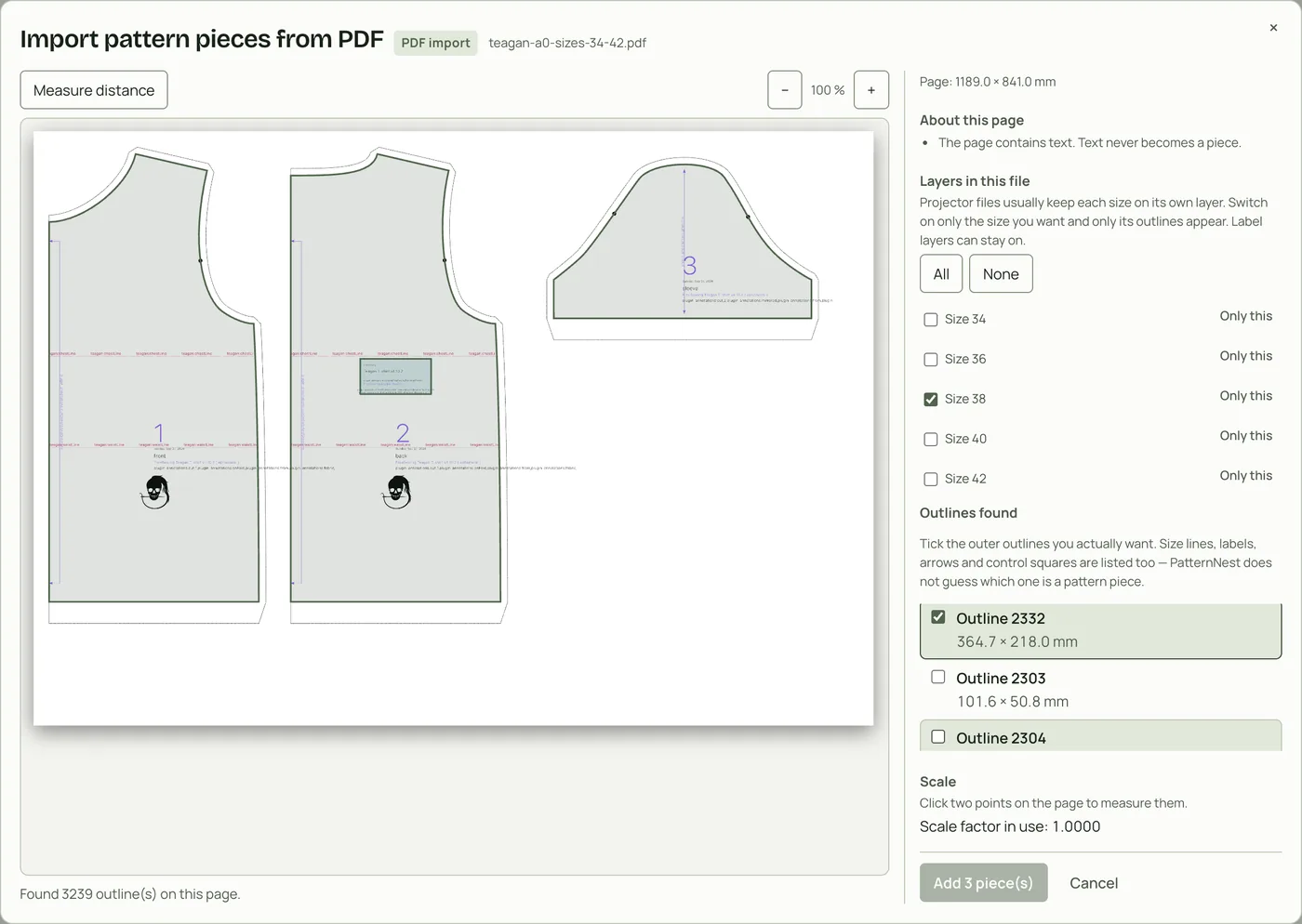
A projector file with sizes on layers
Many bought projector files keep each size on its own PDF layer. PatternNest lists the layers in the import. Click “Only this” next to your size and only its outlines stay; layers with labels can stay on.
What doesn't work
Scans, photos and PDFs that only contain pictures. PatternNest needs lines, not pixels.
Tiled print PDFs on letter or A4 pages. PatternNest doesn't join the tiles. Use the projector or A0 file of the same pattern.
Pattern programs' own project formats, for example Valentina's .val. Export DXF or SVG from the program instead.
Password-protected PDFs. Save a copy without protection first.
Try your file
- Open PatternNest and drop the file onto “Pattern pieces”. Everything stays on your device; the file is not uploaded.
- For a PDF, choose the page and your size and tick the pieces. For SVG and DXF, the closed outlines come in directly.
- Compare the size of one piece in the list with the pattern.
- If PatternNest shows a message instead of pieces, <a href="../import-messages/">the import messages guide</a> says what it means. If the file opens in other programs, send it to [email protected].
Further reading
PatternNest with paper patterns. Preparing an SVG or DXF: Prepare an SVG or DXF sewing pattern.