
Blend between sizes: one size at the bust, another at the hip
Hardly anyone measures one size all over. The usual fix is to blend: bust in one size, waist and hip in another, with a smooth line in between. On paper you draw that line by hand. With a multi-size pattern file, PatternNest can draw it for you.
Short answer: Pick a size for each body level and join the size lines smoothly between them. In PatternNest the Fit and sizes add-on does this on the imported file: “Bust, waist, hip” suggests the three levels, you pick a size at each, tick the pieces sewn to it, and “Apply” redraws the cutting line. The layout and every export then use the new shape.
How blending works on paper
On a printed pattern you mark your size at the bust, the waist and the hip, each on its own size line. Then you draw a smooth curve from mark to mark. Where front and back meet at the side seam you do the same on both, so the seam still has the same length. Notches and the hem follow the new line.
That works, but on a projector file there is no paper to draw on, and on a file with 11 nested sizes it is easy to jump a line.
Blending in PatternNest
- Import the pattern with all its sizes. The add-on keeps the size lines of a PDF that has each size on its own layer, and of SVG or DXF files with nested sizes. Size names come from the PDF layers; in SVG and DXF the sizes are numbered from the inside out.
- Tap “Fit and sizes” on the piece. The dialog says which sizes it found and which one you imported.
- Under “Blend between sizes”, click “Bust, waist, hip”. The add-on suggests the three levels from the shape of the piece. Drag a line in the picture or type the height to move one, or add your own with “Add a level”.
- Pick a size for each level.
- Under “Pieces that go with it”, tick the pieces sewn to this one, so they get the same change.
- Check “Result”: the new length and width, and every seam with both lengths. Then click “Apply”.
“What did I change?” lists every adjusted piece. “Remove adjustment” gives you the piece back exactly as imported.
A real run
For this guide I used a test file I built like a commercial projector file: the FreeSewing Teagan T-shirt (MIT licence) in 11 sizes, 00 to 18, each size on its own PDF layer, with a “lengthen or shorten here” line on every piece. I imported size 10 with “Only this”. On the front piece I clicked “Bust, waist, hip”: the levels came out at 29.2, 46.2 and 66.2 cm from the top. I picked bust 10, waist 12 and hip 14 and ticked “Same change for BACK”.
| Front piece | Size 10 as imported | Bust 10, waist 12, hip 14 |
|---|---|---|
| Length | 71.8 cm | 76.5 cm |
| Width | 33.8 cm | 36.9 cm |
| Seams with the back | 35.9 and 35.9 cm, 50.2 and 50.2 cm: same length |
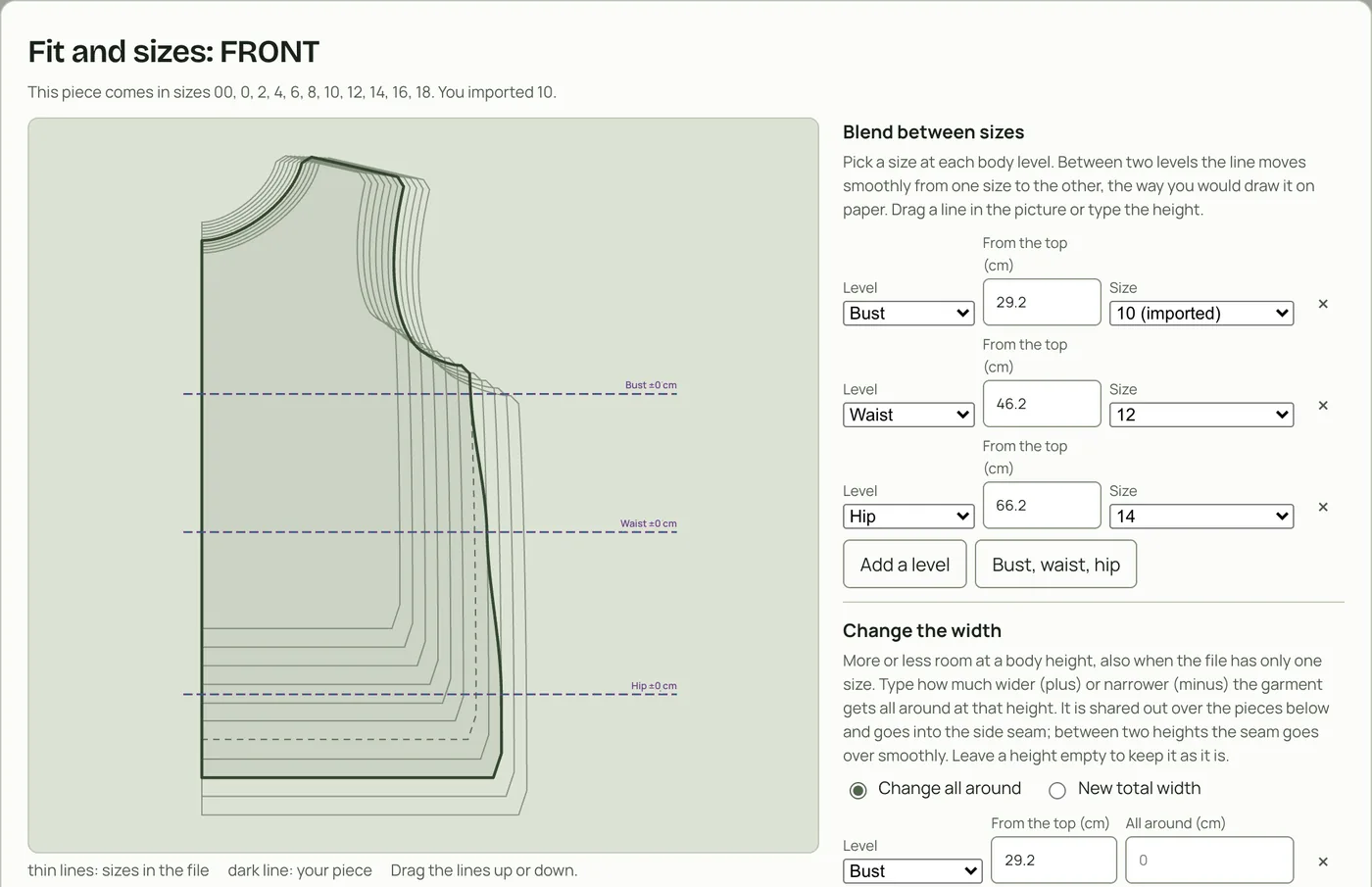
The piece got longer as well as wider. In this file the larger sizes have a longer hem, and the hip at size 14 brings that hem along. If you want the length of your bust size, shorten the piece at the lengthen line afterwards: lengthen or shorten a PDF pattern.
Only one size in the file?
Then there is nothing to blend between, but the add-on can still change the width at a body level. Under “Change the width” you type how much wider or narrower the garment gets all around at that height, and it is shared out over the pieces at the side seam. In the acceptance test on the Teagan T-shirt, 4 cm more all around at the hip gave the front and the back 10 mm more each.
What it doesn't do
The add-on moves the cutting line between sizes and changes width and length. It doesn't do a full bust adjustment, move darts or change the shoulder. If a piece has its grainline running sideways, turn it first with “Turn 90°”, so the levels lie across the body.
Further reading
Picking one size from a layered PDF: Layered PDF sewing pattern: print or project one size. All functions of the add-on: Fit and sizes. Files that work: which pattern files work.
Sources
Test run on 22 November 2026 with the PatternNest version live that day (release ef48d9ae) and the Fit and sizes add-on. Test file built from FreeSewing Teagan, design and code Joost De Cock, MIT licence; it is not a commercial pattern. Runs and article: Cayan / Madegrain, who builds PatternNest.